

SEO Research Rules in Documents vs PROMPTS FAVORITES: Which Is Easier to Maintain?
Direct answer: Use a master document when your rules are mostly stable and you need rationale and revision history. Consider PROMPTS FAVORITES when you repeatedly recombine stable rules with changing conditions and want to inspect the assembled instructions before sending them to a selected Windows target. A hybrid can keep the document as the policy authority and approved working rules as selectable blocks.
An SEO research brief can carry an old source-date rule or an irrelevant article condition when instructions are copied across documents. Compare documents and PROMPTS FAVORITES by how you maintain the stable rules, select assignment conditions, and review the complete prompt before sending it.
Managing SEO research rules in documents vs PROMPTS FAVORITES is therefore less about where you can type instructions and more about how you reuse, vary, review, and maintain them. Documents remain flexible and familiar. PROMPTS FAVORITES offers a more structured path for people who repeatedly assemble prompt instructions on Windows. The right choice depends on whether your workflow is mostly static or regularly recombined.
Start by Separating Rules From Article Decisions
Before comparing tools, divide your instructions into two layers.
The first layer contains stable rules that should apply repeatedly. Examples include defining the search question before drafting, marking unverified claims, distinguishing publication dates from event dates, avoiding unsupported statistics, and recording when a statement depends on a time-sensitive condition.
The second layer contains choices that change by assignment. These may include the article type, reader stage, geographic scope, freshness window, acceptable source types, comparison criteria, or required output structure.
This separation matters in either system. If every prompt is one long block, a document becomes hard to update and a selectable workflow becomes hard to select. Write each instruction so it has one job, then group related instructions under clear internal categories.
Where Documents Work Well
A well-maintained document can be the simplest answer for a solo writer with a small number of stable article types. It is easy to read the entire policy at once, leave editorial notes, and explain why a rule exists. A document is also useful as the human-readable authority from which shorter working prompts are derived.
Use a document effectively by keeping one designated master, adding a visible revision date, and labeling every block as always required, conditional, or article-specific. Instead of maintaining several complete copies, create a short base section and separate add-on sections for news, reviews, tutorials, comparisons, or other formats you actually publish.
The main weakness appears when copying becomes the workflow. Every duplicated prompt creates another place where a rule can become stale. Writers may also copy too much, leaving irrelevant conditions in the prompt, or copy too little and omit a needed check.

Where PROMPTS FAVORITES Changes the Workflow
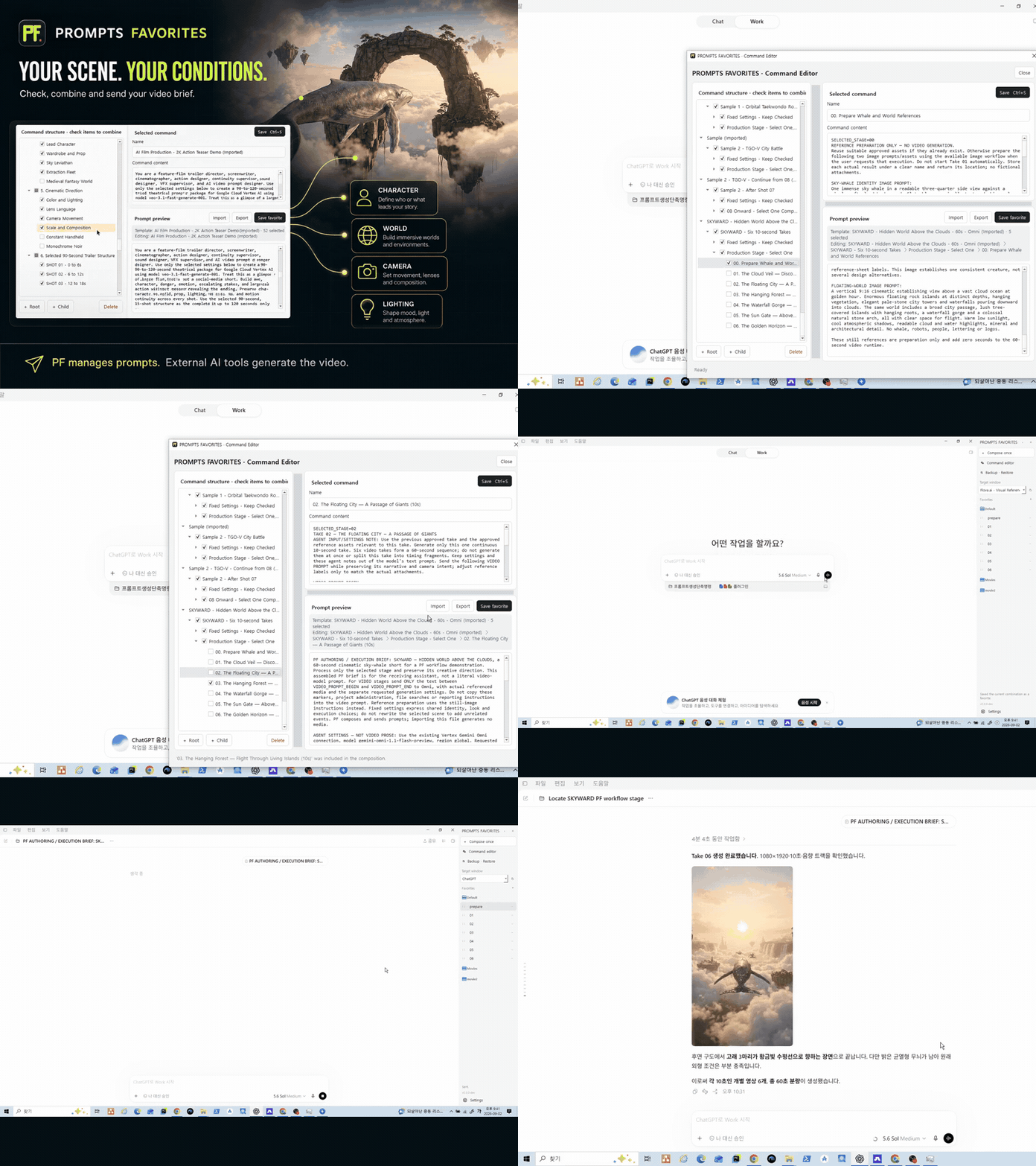
PROMPTS FAVORITES is designed around reusable prompt instructions rather than finished AI output. On Windows, you can organize instructions as hierarchical, selectable blocks, choose the blocks needed for the current task, inspect the combined preview, save named favorites or workflows, and send the prompt instructions to a selected Windows target.
That structure is useful when the same core rules must be combined with different conditions. A workflow might hold a stable research foundation, a source-quality branch, a freshness branch, and separate branches for article formats. For a timely comparison, you select the relevant conditions. For an evergreen tutorial, you choose a different combination while retaining the shared fact-check core.
The combined preview is an important checkpoint. It lets you read the assembled instructions as one prompt before sending them. That does not verify the facts or judge the sources for you; it gives you a chance to catch conflicting, duplicated, or missing instructions in the prompt itself.
Named favorites or workflows can preserve combinations you use repeatedly, while local JSON storage keeps the structured prompt data locally. PROMPTS FAVORITES does not generate the resulting answer, article, code, video, or income. The selected target receives the instructions; the work performed afterward remains separate.
As of September 4, 2026, the verified price is USD 5 monthly or USD 50 annually. Pricing can change, so treat that date as part of the condition rather than as a permanent product rule.

A Practical Side-by-Side Decision
| Workflow question | Documents | PROMPTS FAVORITES |
|---|---|---|
| Best fit | A few stable article types | Many recurring combinations |
| Strongest role | Narrative policy, rationale, and revision history | Selecting and assembling working instructions |
| Review method | Read the master and chosen add-ons | Inspect one combined preview |
| Common maintenance risk | Stale or incomplete copied prompts | Poorly divided or conflicting blocks |
| What it does not do | Enforce careful copying by itself | Verify facts, judge sources, or create the final output |
Choose documents when your rules change infrequently, you value a single narrative policy, and you assemble only a few prompt variations. The lowest-friction setup may be one master document with carefully controlled add-on sections.
Consider PROMPTS FAVORITES when you repeatedly choose among many conditions, maintain several recurring workflow combinations, or want a visible combined preview before sending prompt instructions. Its advantage is not automatic SEO research. Its role is organizing and assembling the instructions that define how you want that research handled.
A hybrid can also be sensible. Keep the rationale, ownership, and revision history in a master policy document. Put only the approved working instructions into selectable blocks. When the policy changes, update the affected block and review the saved workflows that use it. This preserves a readable authority while reducing routine copy-and-paste assembly.
Build a Maintainable Rule System
- Define the stable core. List the research and fact-check rules that truly apply to every article.
- Isolate variables. Create separate blocks for freshness, source types, geography, reader intent, and article format.
- Remove hidden conflicts. Check whether one instruction demands exhaustive coverage while another imposes a narrow limit, or whether two blocks define different date standards.
- Test the assembled instructions. Read the complete prompt before sending it and confirm that every selected rule belongs to the current assignment.
- Review after use. If a rule was unclear or unnecessary, revise the authoritative version instead of fixing only the latest copied prompt.
This process turns the comparison into a workflow decision, not a feature contest. The best system is the one in which a necessary rule can be found, selected, reviewed, and updated without searching through old drafts.