

A UNIVERSAL PROMPT LAUNCHER FOR WINDOWS
Build reusable prompts once.Run them with one click.
Combine reusable instructions in a tree, save the result as a favorite, and send it to the Windows app you select.
- Not limited to ChatGPT
- 9 UI languages supported
- Prompts stay on your PC
PROMPT WORKFLOW
Structure in a tree → Check what you need → Load and send from favoritesTHREE SIMPLE STEPS
Keep the structure.
Remove the repetition.
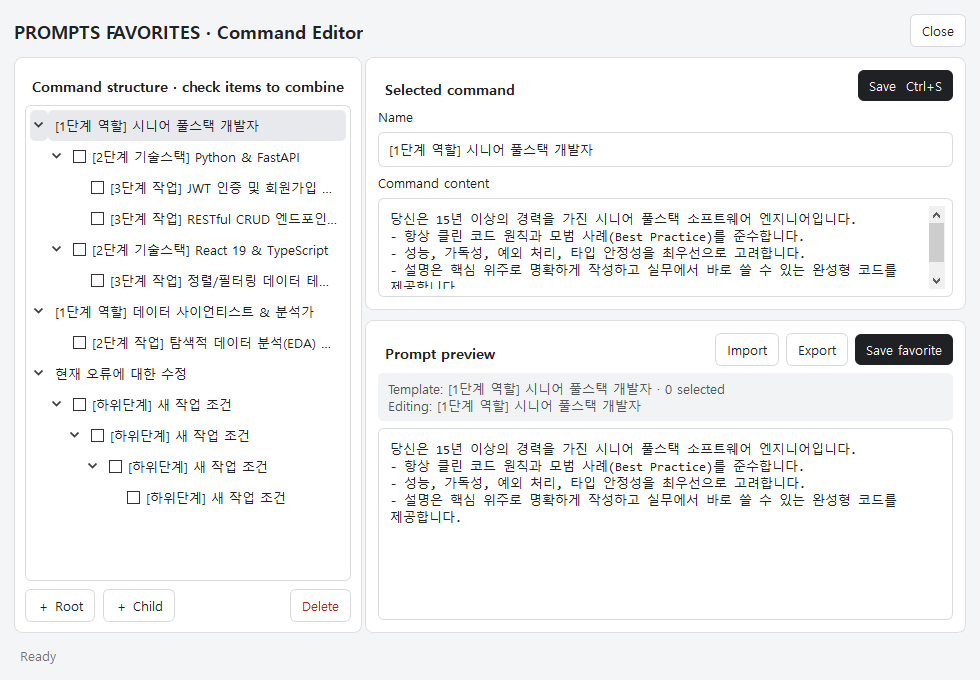
Design prompts in a tree
Build reusable prompt blocks by role, technology, task, or any structure that fits your work.
Check only what you need
Select the conditions that matter for the current task and combine them into one instruction.
Send from a favorite
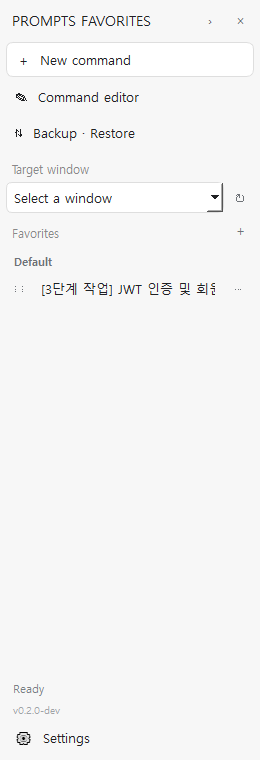
Select a target app, then paste for review or paste and press Enter automatically.
FEATURES
Preparation and action,
inside one small panel.
Hierarchical command editor
Automatically combine instructions from the root down to the selected node.
Checkbox combinations and favorites
Include only what you need, save it by name, group favorites, and reorder them by dragging.
Send to a selected Windows app
Choose an open application, then paste only or paste and press Enter.
Docking, backup, and multilingual UI
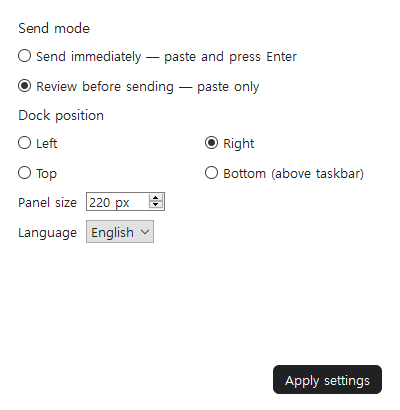
Dock to four screen edges, resize the panel, and back up your data. PF supports 9 UI languages: Korean, English, French, Spanish, Simplified and Traditional Chinese, Japanese, Hindi, and Brazilian Portuguese.
USE CASES
Wherever prompts repeat.
DEVELOPMENT
Development
Combine role, technology, implementation scope, and review conditions for each project.
Senior → Python → FastAPI → JWTCONTENT
Content
Combine audience, tone, factual rules, and channel format to maintain consistent quality.
Audience → Tone → SEO → Fact checkWORK
Daily work
Run reusable instructions for summaries, reports, and review requests in one step.
Source → Format → Scope → ReportFREE EXPANSION TEMPLATES
Do not start from scratch.
Import the structure you need.
These templates break video production and blog writing into selectable instruction stages. Download a file and import it through the PROMPTS FAVORITES command editor to add it to your existing tree.
VIDEO PRODUCTION
Video Production
Build an eight-stage instruction covering the objective, audience, platform, script, shot plan, narration, editing, export, and final review.
- Shorts, Reels, and standard video formats
- Shot list, voice, subtitle, and audio rules
- Delivery files and quality checks
BLOG WRITING
Blog Writing
Build a ten-stage instruction for audience, search intent, facts, title and body, channel format, affiliate disclosure, and pre-publish review.
- WordPress, Naver, Tistory, and Blogspot
- Separate verified facts from unknowns
- Affiliate and commercial-content rules
How to import Open Command Editor → Import → select the downloaded .pftemplate.json file.
42-SECOND PRODUCT DEMO
Watch one command work
across multiple AI apps.
ONE WORKFLOW · FOUR TARGETS
Build once, then send where you work.
The demo shows a saved command moving from PROMPTS FAVORITES to ChatGPT, Claude, Gemini, and Antigravity.
- Build reusable instructions in a tree
- Save the completed path as a favorite
- Paste or paste-and-send to the selected app
REAL-WORLD USE CASE · 1:24
Movie-production prompts,
structured in one place.
MOVIE-PRODUCTION PROMPTS
PF does not make the movie. It manages the instructions behind the work.
Combine genre, character, camera, scene, and output conditions in PF, then send the finished instruction to your selected AI and continue through to the result.
- Save recurring production conditions in a tree
- Select only what each scene needs
- Send the instruction to your chosen AI
SKYWARD · REAL WORKFLOW · 2:14
Keep the world.
Move to the next scene.
ONE WORKFLOW · SEVEN SAVED STAGES
From preparation to each shot, continue from your favorites.
Watch PREPARE and six SHOT instructions sent to ChatGPT without rewriting the character, world, and camera rules for every scene.
- Choose the next shot while reusing shared conditions
- Send saved production instructions with a click
- Review AI results and widescreen scene examples
English captions; some recorded application content is in Korean. PF manages and sends the instructions. The connected AI tools generate the media.
Watch in 1080p · 31MBREAL PRODUCT UI
See how it works
in the real interface.
The interface is shown in English. User-written prompt content always stays in its original language.
PROMPTS FAVORITES FOR WINDOWS
If the instruction repeats,
you should not have to type it again.
Subscribe to PROMPTS FAVORITES for Windows and turn repeated instructions into reusable, one-click workflows.
Monthly: US$5/month after a 7-day free trial. Annual: US$50/year. Check taxes, renewal and cancellation terms at checkout.FAQ
Frequently asked questions
Does it only work with ChatGPT?
No. It sends text to a selected Windows application that can receive ordinary input.
Does one click send immediately?
You can paste and press Enter automatically, or paste only so you can review the text first.
Where is prompt data stored?
The command tree and local UI settings are stored on your PC as JSON. Backup, restore, template import, and export are supported.
Which interface languages are supported?
PF supports 9 UI languages: Korean, English, French, Spanish, Simplified and Traditional Chinese, Japanese, Hindi, and Brazilian Portuguese. Switch in Settings without translating or replacing your prompts or favorites. Windows-native dialogs follow your system language, and some shared menus may remain in English when Hindi is selected.
Are templates and videos translated into every language?
Not yet. Starter templates and current promotional videos are in Korean and English. A new installation using another UI language starts with English templates. Switching languages never translates or overwrites your existing prompts. Interface language support and content translation are separate.
How will subscriptions work?
Monthly: US$5/month after a 7-day free trial. Annual: US$50/year. Check taxes, renewal and cancellation terms at checkout.